 Written by
  Edited by
  Edited by

The W-2 form is one of the most important tax forms. However, unlike many other tax forms, this is not a form you typically have to fill out yourself. Instead, your employer will complete the form and distribute it directly to you. If you are an employer who is unfamiliar with how to fill out a W-2, or you are unsure whether your employees need one, this is everything you need to know.
Working with a financial advisor may help you optimize your tax strategy and your financial goals.
What Is a W-2 Form?
A W-2 form, also referred to as a wage and tax statement, is a form showing how much money an employee earned for that year and the amount of taxes that employers have already paid to the IRS. For 2026, an employer generally must file a W-2 for an employee if it withheld any income, Social Security or Medicare tax, or if it paid the employee at least $2,000 in wages and certain withholding conditions apply. Employers generally must furnish 2026 W-2s to employees by Feb. 1, 2027.
Not everyone needs a W-2 form. Independent contractors and self-employed individuals need a 1099 form instead.
Have you ever confused a W-2 form with a W-4? It is a common mistake. Just remember that employers complete W-2 forms and send the completed forms to employees. With a W-4 form, however, employees complete the forms themselves. When someone starts a new job or experiences a change in their financial circumstances or tax filing status, that person fills out a W-4 form listing their deductions. That lets their their employers know what amount of taxes to withhold.
How Many W-2 Forms Do I Need?
In total, employers produce six copies of every W-2 form. Three of those copies go to the employee. The employee then files them with their tax returns. Meanwhile, employers keep a copy for themselves.
Two copies also go to the government. One goes to the Social Security Administration (SSA), along with a W-3 form that includes a summary of all W-2s for every worker on payroll. Employers can file electronically with the SSA, and some employers are required to do so. The other copy goes to the appropriate state, city or local tax department.
What Goes on a W-2 Form?
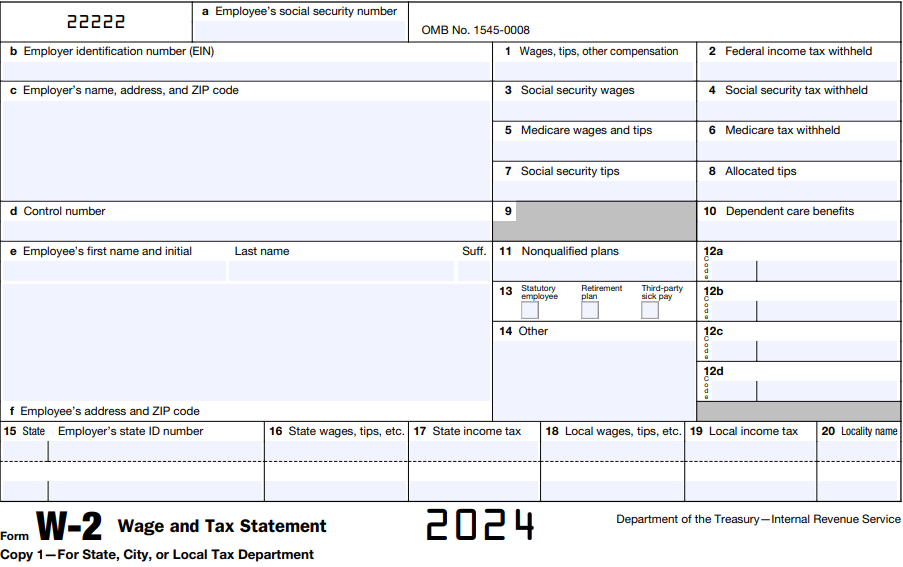
When completing a W-2 form, an employee’s Social Security number goes at the very top. Directly below that is a spot for your identification number, followed by your name and address.
There is also a control number that you may or may not use for payroll purposes. That comes right before the employee’s name and mailing address.
Before you file your return, use our income tax calculator to estimate what you may owe or receive.
Boxes 1 – 10
Here is what you will find in boxes 1-10:
- Box 1 shows wages, tips and other compensation subject to federal income tax.
- Box 2 shows the federal income tax withheld from the employee’s pay.
- Box 3 reports Social Security wages. For 2026, Social Security wages for an employee generally cannot exceed the $184,500 annual wage base.
- Box 4 reports Social Security tax withheld.
- Box 5 reports wages and tips subject to Medicare tax. Unlike Social Security wages, Medicare wages do not have an annual wage base limit.
- Box 6 reports Medicare tax withheld, including any Additional Medicare Tax withheld from the employee.
- Boxes 7 and 8 report Social Security tips and allocated tips, when applicable.
- Box 10 reports dependent care benefits.
Boxes 11 – 14
The next set of boxes, 11-14, contains the following:
- Box 11 is for certain distributions from non-qualified plans.
- Box 12 reports several types of compensation and benefits using IRS letter codes, such as certain retirement plan contributions.
- Box 13 contains checkboxes for statutory employees, retirement plan participants and third-party sick pay.
- Box 14 can be used for certain other information an employer wants to or is required to report.
Boxes 15 – 20
Here is what to expect in the final set of boxes, 15-20:
- Write your state and employer state ID number in Box 15 if your state requires you to do so.
- Box 16 is for an employee’s total earnings that are subject to state income tax withholding.
- Box 17 indicates the total state income tax amount withheld.
- All income eligible for local taxation goes in Box 18.
- The amount of local taxes withheld is noted in Box 19.
- Box 20 is for the specific name of the place that the local taxes are tied to.
How to Check a W-2 Before Sending It
Before filing a W-2, an employer can compare the form with its payroll records for the year. Start by looking at the employee’s name and Social Security number, as an identification error can interfere with the SSA’s wage records. The employer’s legal name, address and employer identification number should also match the information used for employment tax filings.
Then, compare the wage and withholding boxes with payroll totals. Boxes 1, 3 and 5 do not necessarily contain the same number because federal income tax, Social Security and Medicare rules can treat some benefits and deductions differently. For example, an employee’s eligible pretax contribution to a traditional 401(k) can reduce the wages reported in Box 1 without similarly reducing Social Security and Medicare wages.
Employers should also reconcile W-2 and W-3 totals with applicable employment tax returns. A mismatch does not necessarily mean the W-2 is wrong. However, it’s worth identifying differences before filing rather than assuming they are harmless.
If an employer discovers an error after filing W-2, they should generally make the correction using Form W-2c. Corrections should be filed and furnished to affected employees as soon as possible after the error is discovered.
Employees: How to Find Your W-2 Online and What to Do If It’s Missing
Employers typically send W-2 forms through the mail. It is also common for your employer to make your W-2 available online. If you visit your company’s online payment or HR system, there’s normally a tab for your tax forms, including your W-2.
As mentioned above, the law requires employers to send your W-2 by Feb. 1, 2027, for wages paid in 2026. It may take a few days after that deadline for forms to appear online. You can also get a copy of your W-2 straight from the IRS.
If you’re missing a W-2 form or if you lose the form, be sure to contact your employer as soon as possible. If you don’t receive the forms by mid-February, it’s a good idea to give the IRS a call.
You will need your W-2 to complete your tax return. But, if worst comes to worst, you could fill out Form 4852 instead. This form serves as a substitute wage and tax statement if you did not receive or lost your W-2. You may also want to consider filing for an extension if you are unable to obtain all necessary forms by the end of February.
If you receive your W-2 later and it differs from the estimates you made on Form 4852, you can complete an additional form, Form 1040X, so your tax return is accurate. This is known as filing an amended tax return.
How to File a W-2 Form
For 2026 Forms W-2, employers generally must file Copy A with the SSA by Feb. 1, 2027. The same deadline generally applies to furnishing employee copies.
Employers filing electronically can use the SSA’s Business Services Online system. Employers that file paper forms must use an official scannable Copy A or an approved substitute. A Copy A printed from the informational version available on IRS.gov should not be filed with the SSA.
You’ll also need to complete a W-3 form, which is a transmittal form that summarizes all the W-2 forms you are submitting. Employers filing W-2 information electronically through the SSA’s system generally do not need to separately submit a paper W-3. Instead, the system generates the W-3 information from the W-2 entries.
Employers should keep copies of W-2 and W-3 forms for their records. The IRS instructions say to keep a copy of each W-2 Copy A and Form W-3 for at least four years.
W-2 vs. 1099: Key Differences for Employers and Workers
Understanding the difference between W-2 and 1099 classifications is essential for both employers and workers. These two forms reflect fundamentally different work arrangements, each with its own tax reporting rules, legal responsibilities and financial implications.
Employment Classification
- A W-2 worker is a traditional employee. Employers are responsible for withholding income taxes, Social Security and Medicare taxes from their paychecks. W-2 employees may also receive benefits such as health insurance, paid time off and retirement plan contributions.
- A 1099 worker is typically an independent contractor. These individuals are self-employed and receive full payment without tax withholdings. They are responsible for reporting and paying their own self-employment taxes and estimated quarterly taxes to the IRS.
Tax Filing Responsibilities
- W-2 employees receive their tax documents directly from their employer and usually only file an individual tax return (Form 1040), using the W-2 as a supporting document.
- 1099 workers receive one or more Form 1099-NEC from clients who paid them $600 or more in the tax year. They may need to file Schedule C (Profit or Loss From Business) and Schedule SE (Self-Employment Tax) with their Form 1040.
Employer Obligations
- Employers must withhold and remit employment taxes for W-2 employees, file quarterly payroll reports and issue W-2s by the February 2 deadline.
- For 1099 workers, employers do not withhold taxes or offer employee benefits. However, they must report payments on Form 1099-NEC and send copies to both the contractor and the IRS by the required deadline.
Legal and Financial Risks
- Misclassifying a worker as a 1099 contractor when they should be treated as a W-2 employee can lead to penalties, back taxes and interest charges for employers. The IRS and Department of Labor may audit businesses to verify worker classification compliance.
How to Determine the Correct Classification
To determine the correct classification for employees, use the IRS’s Common Law Test. This test evaluates the degree of control the business has over the worker. There are three main assessments:
- Behavioral: Does the company control how the worker does their job?
- Financial: Does the company control the business aspects, such as payment and reimbursement?
- Type of relationship: Are there benefits, contracts or expectations of ongoing work?
Employers unsure about proper classification can file Form SS-8 with the IRS to request a formal determination. It is critical that you get the classification correct so you can meet your tax obligations and avoid potential compliance issues.
Bottom Line

The W-2 form is an important document for both employers and employees. Employers use it to report wages and taxes withheld during the year, while employees use the information when completing their income tax returns. For 2026 wages, employers generally must furnish W-2s to employees and file them with the SSA by Feb. 1, 2027. Reviewing employee information and reconciling wage and tax totals before filing can help identify errors that otherwise may require a corrected W-2 later.
Tax Season Tips
- Some financial advisors can help you create a tax strategy for your investments and overall estate. Finding a financial advisor doesn’t have to be hard. SmartAsset’s free tool matches you with vetted financial advisors who serve your area, and you can have a free introductory call with your advisor matches to decide which one you feel is right for you. If you’re ready to find an advisor who can help you achieve your financial goals, get started now.
- You can do your taxes by hand, transferring info from your W-2 and other forms onto your Form 1040 according to the instructions. Or you could pay for a tax prep program to make it a little easier. Check out our roundup of various tax software to see which service might be best for you.
- If you don’t know whether you’re better off with the standard deduction versus itemized, you might want to read up on it and do some math. You could find that you’d save a significant amount of money one way or another. So it’s best to educate yourself before the tax return deadline.
Photo credit: ©iStock.com/ITkach, Image of 2018 W-2 Form comes from IRS.gov, ©iStock.com/Steve Debenport