 Written by
  Edited by
IRS Form 8962 is used to reconcile the tax credit you are entitled to with any advance credit payments (or subsidies) for the tax year. The size of your tax credit depends on the cost of available health insurance, the size of your family and where you live. A financial advisor with tax expertise may help you optimize a tax strategy for your financial needs and goals. Read on for more essential information about Form 8962.
What Is Form 8962?
Form 8962 helps taxpayers figure out their Premium Tax Credit (PTC) for the year when filing a federal income tax return. It also provides a way to compare that credit with any advance payments of the Advance Premium Tax Credit (APTC) they received during the year, allowing them to determine whether they owe additional tax or qualify for a refund.
Not everyone can file Form 8962 and claim the PTC. Only those who have health insurance through the Affordable Care Act Health Insurance Marketplace (also known as the exchange) are eligible to use Form 8962, and not everyone who has marketplace coverage can qualify. If you used healthcare.gov or your state’s health insurance exchange to get coverage, you may qualify.
You can’t use Form 8962 if you get health insurance through another insurer and receive a 1095-B form documenting your health insurance coverage. You also can’t use Form 8962 if you get coverage through your employer and receive a 1095-C form. If you have marketplace coverage and received a 1095-A form documenting that coverage, you may be a candidate for the PTC.
What Is APTC?
When you signed onto the Health Insurance Marketplace to enroll in a qualified health plan, the system told you whether you qualified for a subsidy. The marketplace determined your eligibility for a subsidy, which is also your advance payment or APTC, based on what you entered as your income and personal exemptions.
If either your income or personal exemptions changed during the year, you should have reported those changes to the marketplace. If you didn’t, you might have been receiving too much or too little in APTC.
On the other hand, if, say, your income rose and you didn’t report it, the government might have been overpaying APTC to you or your insurer. In that case, when you use Form 8962 to reconcile your PTC eligibility with the APTC already paid, you may have to repay the difference.
However, if you’re eligible for more money in PTC than was paid in APTC, you could get the difference back in your tax refund.
Who Must File Form 8962?
You must file Form 8962 with your 1040 or 1040NR if any of the following apply:
- You want to take the PTC
- APTC was paid during the year for you or someone in your tax household
- APTC was paid for someone (including you) for whom you told the marketplace you would claim a personal exemption and neither you nor anyone else claims a personal exemption for that person
If any of these conditions apply to you, you must file Form 8962 with your income tax return. This is the case even if you otherwise wouldn’t need to file taxes. And if you’re required to file Form 8962 you can’t use Form 1040-PR or Form 1040-SS. (If you’re filing an amended return for a previous year, note that prior to 2018, you could not file Form 8962 with Form 1040EZ.)
How to Fill Out Form 8962
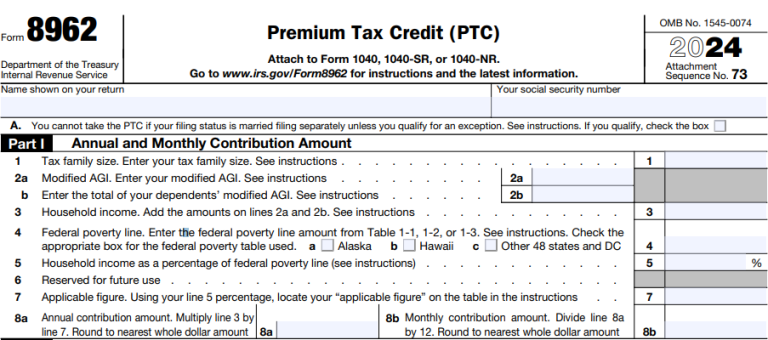
Form 8962 is divided into five parts. Before you dive into Part I, write your name and Social Security number at the top of the form. Part I is where you enter your annual and monthly contribution amounts. You’ll enter the number of exemptions and the modified adjusted gross income (MAGI) from your 1040 or 1040NR.
You’ll also enter your household income as a percentage of the federal poverty line. Consult the table in the IRS Instructions for Form 8962 to fill out the form. By the end of Part I, you’ll have your annual and monthly contribution amounts (lines 8a and 8b).
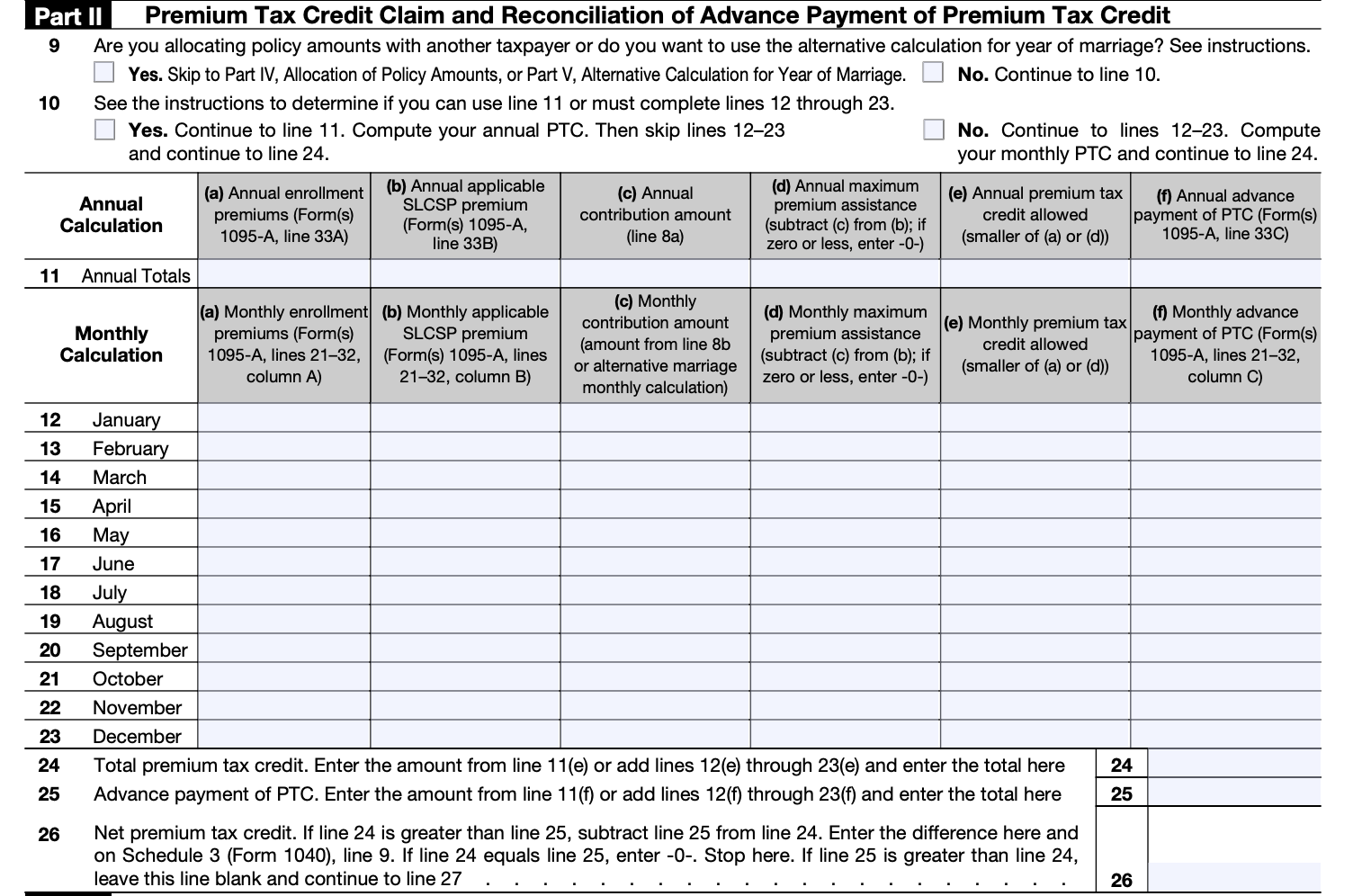
Now on to Part II, Premium Tax Credit Claim and Reconciliation of Advance Payment of Premium Tax Credit. This is where you’ll figure out your PTC and compare it against any advance payments (APTC). If you had marketplace coverage for the whole year you’ll use Line 11 to enter your annual totals. Otherwise, use one or more of the lines for the 12 months of the year to enter your monthly contributions.
At the end of Part II, you’ll have three very important numbers to enter. On line 24 you’ll write the total PTC. On line 25 you’ll write the advance payment of the PTC amount. And on line 26 you’ll write the net PTC.
If the amount on line 24 is greater than that on line 25, subtract line 25’s amount from line 24. Enter the difference on line 26 and on your 1040 or 1040NR form. That’s your net PTC. You’re getting a tax credit! If you elected the alternative calculation for marriage, enter zero. If line 24 equals line 25, enter zero. Stop here.
But if line 25 (your APTC) is greater than line 24 (your PTC), leave line 26 blank and continue to line 27.

If your APTC is greater than your PTC, you’ll need to enter this information in Part III. On line 27, subtract line 24 from line 25 if line 25 is greater. Follow the form instructions to enter the repayment limitation on line 28. Enter your excess advance premium tax credit repayment on line 29. Write the smaller of either line 27 or line 28 on line 29, and on your Form 1040 or 1040NR. That’s the amount you owe in repayment for getting more than your fair share in advance payment of the PTC.
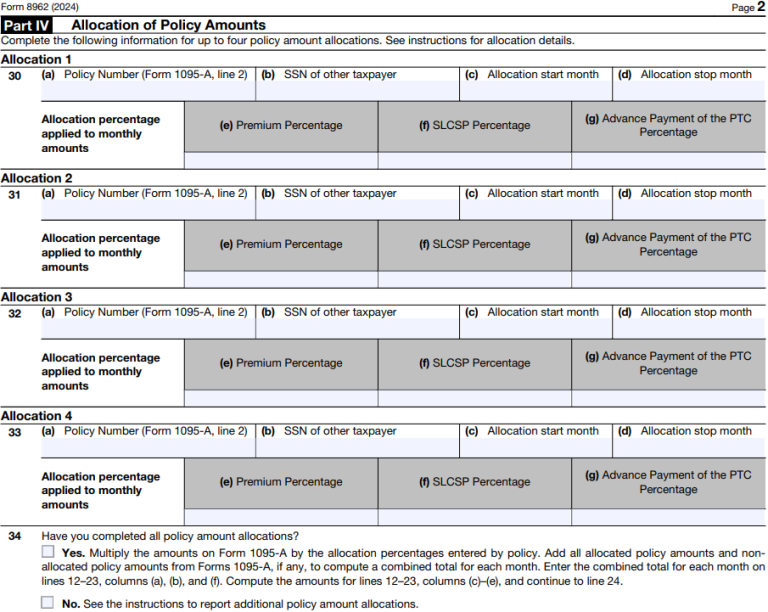
You might not need to use Part IV at all, depending on your situation. Lines 1 and 9 include notes that help you determine whether Part IV is necessary for you. Part IV is for Shared Policy Allocations. You can enter information for up to four of them. This is relevant in cases where a health care policy was shared between two “tax families.” So, if you and your spouse are filing separately but were covered by the same policy, follow the instructions for this section.
Or, if you got divorced in the tax year and are now filing separately but at one point during the year you both were covered by the same health care policy, this section is also for you. If no APTC was paid for a policy shared between two tax families, consult the Form 8962 instructions. You and the other tax family will have to decide how you will split the burden of reconciling any APTC repayments if applicable.
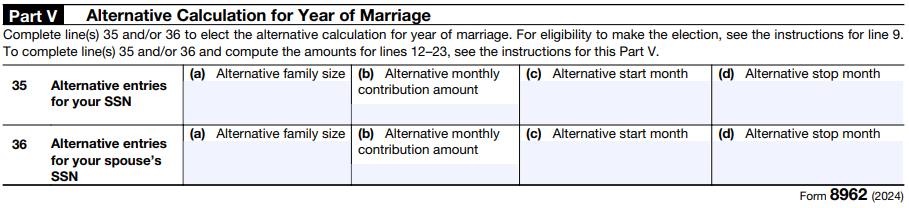
Part V is only for couples who got married in the tax year for which they’re filling out Form 8962. If this isn’t you, you can ignore this section. If this is you, consult the directions to figure out whether you need to fill out this section. The chart (Table 4) in the form instructions will help you determine whether you are eligible for the alternative calculation.
Estimate how deductions and credits could lower your tax bill with our income tax calculator.
How Much Could a Financial Advisor be Worth to You?
Calculate how much a financial advisor can potentially add to your net worth over time given your circumstances.
Final Net Worth with an Advisor
Final Net Worth without an Advisor
About This Calculator
This calculator is based on the assumptions and equations detailed in SmartAsset's whitepaper, "The Value of a Financial Advisor: What's It Really Worth?". Users can input their own data – such as their current age, planned retirement age, income and investments – to find the projected value a financial advisor could be worth over their lifetime. Advanced fields let users customize other inputs such as their investment performance, the rate of inflation over time, their savings rate, and rate of withdrawal in retirement.
Assumptions
Assumptions come from SmartAsset's whitepaper, "The Value of a Financial Advisor: What's It Really Worth?" For years left until retirement, the client is assumed to be contributing a percentage of their income to their investments. These investments are assumed to grow over time, while fees are deducted in cases where the client maintains the services of a financial advisor. In either case, values account for inflation and are presented in today's dollars.
During retirement, savings contributions are assumed to end and withdrawals from the investment pool are assumed to be 4% unless user inputs dictate otherwise. Default values reflect an assumption that a retiree will reallocate their investments to a more conservative mix with a lower rate of return. Fees are still removed in the case the client has an advisor and inflation is accounted for.
The default value for inflation (2.56%) is based on annual historical data for 2000 through 2023. The default value for investment performance is based on S&P 500 performance (investment growth during career) and Moody's AAA rated corporate bonds performance (investment growth during retirement) for January 2000 through August 2024. The default annual savings rate (5.69%) is based on historical data from the Federal Reserve for the same time period.
An advisor is assumed to yield an additional annual average of 1.0495% of a client's income in tax savings during their career and 2.47% premium in annual returns, whether through investment allocations and performance, general guidance and coaching, or other more custom areas of financial benefit.
Advisor fees are removed from the net worth over time. Fees are 1% annually for people with an inputted current net worth of less than $1 million. At $1 million starting net worth and above, annual fees are 0.75%.
The duration of the relationship between the client and the financial advisor is assumed to end at age 77. A divergent assumption from the whitepaper in order to allow senior users access to the calculator is that if the user inputs their current age as 68 or older, the duration of the relationship is assumed to be 10 years.
This hypothetical example is for illustrative purposes only and does not represent an actual client or specific security. Actual results will vary.
This is not an offer to buy or sell any security or interest. All investing involves risk, including loss of principal. Working with an adviser may come with potential downsides such as payment of fees (which will reduce returns). Past performance is not a guarantee of future results. There are no guarantees that working with an adviser will yield positive returns. The existence of a fiduciary duty does not prevent the rise of potential conflicts of interest.
Articles, opinions, and tools are for general information only and are not intended to provide specific advice or recommendations for any individual. We suggest that you consult your accountant, tax, or legal advisor concerning your individual situation.
SmartAsset.com is not intended to provide legal advice, tax advice, accounting advice or financial advice (Other than referring users to third party advisers registered or chartered as fiduciaries ("Adviser(s)") with a regulatory body in the United States). Articles, opinions, and tools are for general information only and are not intended to provide specific advice or recommendations for any individual. We suggest that you consult your accountant, tax, or legal advisor concerning your individual situation.
It is not possible to invest directly in an index. Exposure to an asset class represented by an index may be available through investable instruments based on that index. Indexes do not pay transaction charges or management fees.
The above summary/prices/quote/statistics have been obtained from sources we believe to be reliable, but we cannot guarantee their accuracy or completeness.
Bottom Line

Of course, using tax preparation software like TaxAct or H&R Block or a tax accountant will simplify filling out Form 8962. But since the Premium Tax Credit is meant to help families afford health insurance, you may want to save the money and fill out the form yourself. While they seem complicated, IRS instructions are quite clear. And with any luck, you will get a refund.
Tips for Filing Your Taxes
- If you want professional help preparing your returns, consider hiring a financial advisor who also provides tax prep or who works with a tax accountant. Finding a financial advisor doesn’t have to be hard. SmartAsset’s free tool matches you with vetted financial advisors who serve your area, and you can have a free introductory call with your advisor matches to decide which one you feel is right for you. If you’re ready to find an advisor who can help you achieve your financial goals, get started now.
- If you need more time to do your taxes, you can file for an extension using Form 4868. That said, filing Form 4868 will only extend when your tax return is due. If you owe any taxes for 2024, they are still due April 15, 2025. So you should estimate how much you owe and pay it when you file Form 4868.
- If you don’t know whether you’re better off with the standard deduction versus itemizing your deductions, be sure to read up on the two options and do some math. You might find that you’d save a significant amount of money one way or another, so it’s best to educate yourself before the tax return deadline.
Photo credit: ©iStock.com/Jacob Wackerhausen, All images of Form 8962 come from IRS.gov, ©iStock.com/ayo888